Showing posts with label Popplet. Show all posts

Tuesday, 5 May 2015

Blogging in the classroom - after two years I weigh the pros and cons of my "teacher blog" (...and create a "students blog")


I have been a blogger for nearly two years. 
I use my educational blog The Travelling Teachers  almost every day in my classes and my students are asked to use it at home.
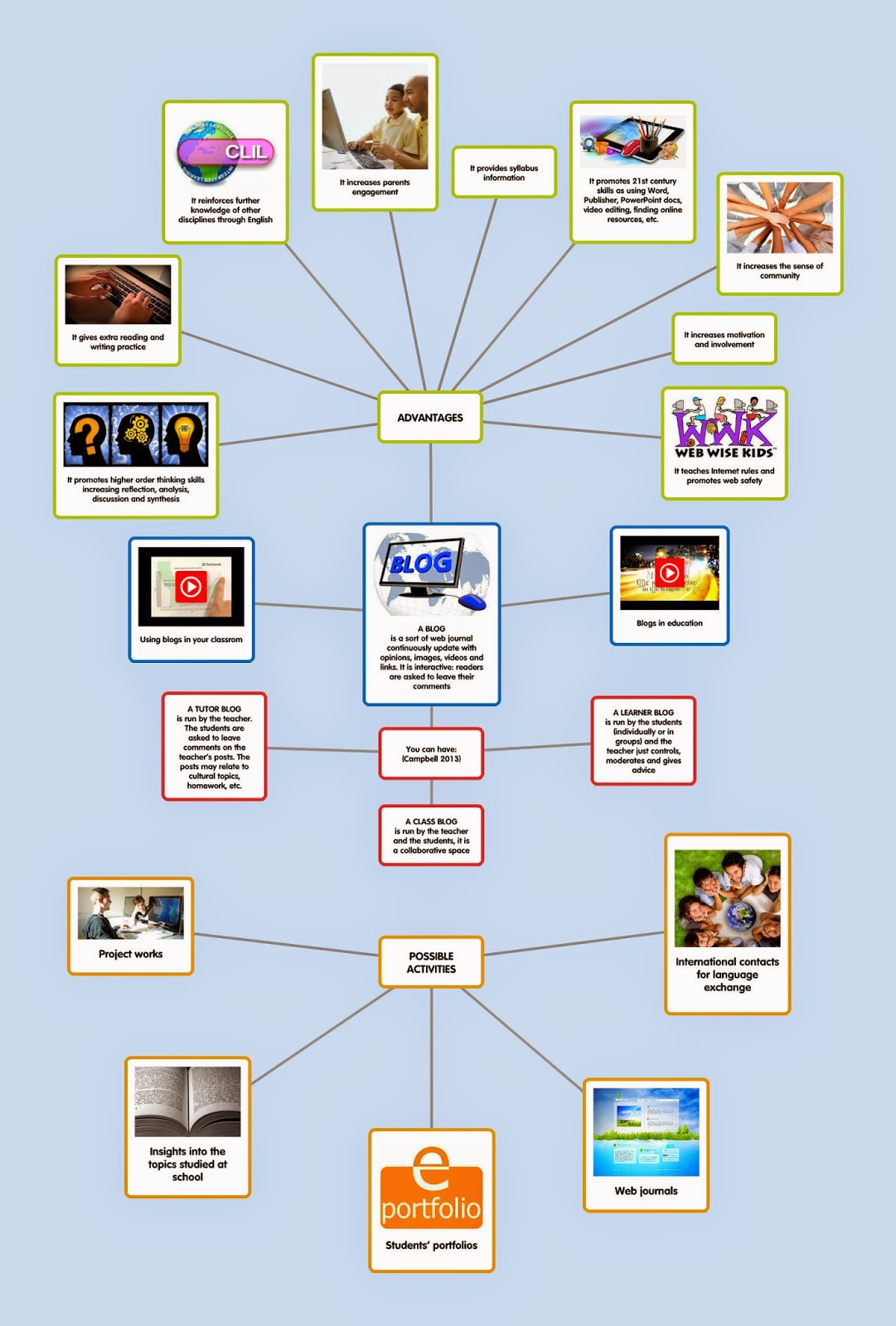
I have already written on this blog about the advantages of blogging in the classrom and  I propose again my Popplet mind-map about it below.

Click on the image to open it

After two years I can say that my students are more engaged than before, they are enthusiastic about using my blog both at home and in the classroom. 
Blogs support writing, reading, listening and even speaking skills
In the classroom (blended learning) we read some posts, translate them and comment on them. We watch some videos, listen to some songs or surf the Net through the suggested links. 
At home students can enter their reflections on posted questions, publish their own questions and share opinions. They are sometimes asked to study a particular topic on the blog at home and relate to the classmates and to the teacher about it in the classroom. (flipped learning).


By blogging, we also reach some important goals concerning technology. Students exercise their digital citizenship and understand some ethical, cultural, and societal issues related to technology; they also learn to use some technology tools to increase their productivity and creativity; they improve their knowledge of other disciplines through the foreign language (CLIL); they use the English language both within and beyond the school and, in the end, they start becoming life-long learners by using the foreign language for personal enjoyment and enrichment. 


But I realised that something was missing... 
Students did not willingly leave their comments on the posts. 
An educational blog should improve the students' way of expressing themselves.  In fact being published, by leaving their comments, should be an incentive for many students. Even the most shy students should feel empowered and motivated by expressing themselves better in a written discussion than in front of a class.
But, when asked to leave their comments on the posts or to answer some questions in a written form, my students felt intimidated. Absurdly, they preferred writing them on their exercise-book because they were afraid of my blog visibility (my students are young learners, unaccostumed to social networks and impractical in using social forums).


How to solve this problem? I really wanted my students to write more. I decided to create a students blog to make the learners more active, more self-confident and more and centered on their own learning process.


I created this image with Cacoo.

The Michelangelo English Club was born, on an experimental basis, a month ago.
It is meant to be a blog for the students of my classes, it will contain all their projects, works, reports and researches. The posts will entirely be written by the students. Learners will gradually feel more confident in writing posts and leaving comments because this blog will be their own, they will feel "at home".
Of course we will continue to use my blog, as well. The "teacher blog" and the "students blog" will be closely related and... we will see what happens!


Sunday, 14 December 2014

A Christmas Carol: a flipped lesson.


Every year at Christmas time I talk about A Christmas Carol in my classes for many different reasons. It is a wonderful Christmas tale and it allows to study some aspects of British literature, as well. We usually watch the last Disney movie and we read some excerpts from the book.
This year I thought of a flipped lesson. Students have to gather information and do some research about the tale before watching the movie or reading the book. Then, they will discuss the topics concerning the novella, the author and the Victorian Era in their classroom. As a teacher, I will just provide the learning material, suggest the websites to surf outside the classroom and guide my students to apply their knowledge during class activities.
As usual, I prepared a lesson with the help of some digital tools. I created a mindmap with Cacoo and I made it interactive with Thinglink.
If you move the cursor over the image below, some icons will appear. Click on them to open the links. You will find some information about Charles Dickens, the main characters of his novella and some fun activities.


The following is a deepening on the Victorian Era for more advanced students. I prepared this mindmap with Popplet. You will find some videos, links and a PowerPoint presentation. 
Click on the following symbol on the image to enlarge:


Inside the classroom the students will discuss what they have learned outside the classroom. They will actively and interactively apply their knowledge.

Some ideas for class discussion:

  • What are the moral lessons in this story?
  • Describe how Scrooge changes during the night of Christmas Eve.
  • Would a visit from the three spirits of the tale impact your life? How?
  • How would you describe the Victorian Era?
  • Can we see any typical aspects of the Victorian Age in the novella? 
  • What is Dickens' position towards the social problems of his era?


Tuesday, 7 October 2014

The Victorian Era


The Victorian Age takes its name from Queen Victoria who ruled from 1837 to 1901. Victorian era was caracterised by stability, progress, social reforms, a rapid extention of colonialism but, at the same time, by great problems such as poverty and social injustice.

Surf the great BBC history site.
Victorians:

British History Timeline:

Then take a look at my interactive Popplet mindmap about some aspects of the Victorian age. Click on the image to open it, then scroll around, zoom, click on the links and watch the videos.


STUDENTS' TASKS


          Reading and Writing


1) Choose an aspect of the Victorian age that has particularly affected you. Surf the sites I suggested in my mindmap and write a report.


2) Imagine you are a Victorian child belonging to a poor family, forced to work in a factory. Describe your working day.


3) Which novel (of the two I talk about in my presentation) do you like the most? Why? 


                Listening


Watch and listen to the video "Life in Victorian Britain" from the mindmap. Take note of the main points of discussion and create your own mindmap.


                               Speaking


Work in pairs or small groups. Read the information about the Victorian etiquette and choose a social situation. Would you know how to conduct yourselves if you were Victorians? You can practice taking the  McCord Museum test. Then prepare a sketch.


Thursday, 4 September 2014

Why should we use blogs in our classroom?


An educational blog can change our students' way of expressing themselves. Learners are asked to leave their comments. In fact, being published is an incentive and motivation for many students. Even the most shy students might feel empowered by being able to express themselves better in a written discussion than in front of a class.
Blogs support writing, reading, listening and speaking skills . Students can enter reflections on posted questions, publish essays or questions and share opinions. 

You can also reach some important goals concerning technology. Students can understand the ethical, cultural, and societal issues related to technology; they can use technology tools to increase productivity and creativity; they can improve their knowledge of other disciplines through the foreign language; they can use the language both within and beyond the school and, in the end, they can start becoming life-long learners by using the foreign language for personal enjoyment and enrichment. 
In the following Blendspace lesson I've put together some useful resources about blogs in education:


Now take a look at my Popplet presentation.
Click below to open the mindmap, then zoom and scroll around.


Wednesday, 15 January 2014

For teachers - free tools for mindmapping

This time I tried some free tools for  
schemes and mindmapping  
(sometimes you can use just a given number of free maps, then you are asked to upgrade).
As usual I've created some simple examples for you, just to give you the idea and make your choice easier.


Why should a teacher use mindmapping?

  • A visual map gets students attention and focus
  • Mind mapping enables teachers to organize, summarize and  manipulate ideas and concepts very easily
  • It allows to present information in a visually attracting and comprehensive way
  • Its organizational structure helps students understand effectively
  • It promotes inquiry and problem solving
  • It promotes active note taking

The first tool I tried is Popplet.
It combines presentations , mindmapping and online bulletins. You can  integrate text, images, video, and Google maps.


http://popplet.com/
My example: http://popplet.com/app/#/1559358

Then I tried Spiderscribe
It allows you to  easily visualize your ideas by connecting various pieces of information together. It also combines elements like text, images, files, calendar events and geographic locations.


http://www.spiderscribe.net/
My example: http://www.spiderscribe.net/app/?ac420a5aeab2f33f7cb411eeebec5938

This is Spicynodes.
It allows you to create visually attractive nodes for your blog or websites. Nodes are visually displayed pieces of information that helps visitors easily navigate the content of your site so that they find what they are looking for.You have to click on the nodes to open them.

http://www.spicynodes.org/
My example: http://www.spicynodes.org/a/199c482ed6e8fe4de02ad4db20039e4c

I also tried Text2mindmap.
It converts texts into mind maps.


https://www.text2mindmap.com/ 
My example:
https://www.text2mindmap.com/k7XZDE?controller=frontpage&method=index&map=k7XZDE


This is Slatebox.

It allows you the freedom to create as many nodes and maps as possible. You can upload  images from the app itself. 


Slatebox:
http://slatebox.com/
Actually I didn't manage to save a link so I uploaded the .png file of my example for you.


The last tool I tried for you is Mindomo.

It has several features such as including a clipart library, importing images from Google images or Flickr , and using video straight from YouTube. If you want to use the free version you can just import images from the library.


http://www.mindomo.com/
My example: http://www.mindomo.com/mindmap/0c71d1cf14034f07aaff536e11b2d5ab

I hope to be helpful! BFN and have fun with your mindmaps!